AI Document Processing Supply Chain & Logistics OCR | Extend
Screen UI design example from Extend. The screen is a marketing product page for 'Supply Chain & Logistics' document processing. It features a clean, multi-section layout with a light background and a grid pattern overlay. The header contains the 'extend' logo, horizontal navigation links (About, Customers, Resources, Pricing, Docs), and a 'GET STARTED' button. The 'Resources' navigation item has a dropdown caret, indicating an open dropdown. The hero section presents the main title 'Supply Chain & Logistics' and a subtitle. Below, a 'Trusted by leading AI teams' section showcases several company logos (Pallet, ZAUBER, C.H. ROBINSON, nuvo cargo, OVRSEA). The main content is structured into several sections, each detailing a feature of the document parsing service. These sections typically include a title, a descriptive paragraph, an icon, and a stylized illustration of a document or data extraction process. Examples include 'Classify and Continuously Improve', 'Handle Endless Formats', 'Get High-Stakes Amounts Right', 'Parse Thousands of Rows', and 'Extract Dense Layouts'. A prominent section titled 'The highest performance document APIs for your agents and pipelines. Processing millions of pages every day.' features a vertical navigation with items like '/parse', '/extract', '/split', '/classify', and '/edit'. The '/parse' item is visibly selected. This section also includes a large illustration of a document being processed and a 'Capabilities' list with icons and descriptions. Further down, a 'See logistics documents parsed side by side' section allows users to select different document types (Bill of Lading, Freight Invoice, Customs Form, Export Declaration, Shipping Form, Compliance Certif.). 'Bill of Lading' is visibly selected. This section then displays a comparison view of an 'ORIGINAL' document against outputs from 'Extend', 'Textract', 'Azure DI', and 'Gemini Flash', with 'Extend' being the active tab. Each comparison view shows a document with highlighted data fields and a count of 'blocks'. A legend at the bottom explains the color-coding for different data types (Barcode, Figure, Footer, Heading, Key Value, Section Heading, Table, Text). The page concludes with a call-to-action banner 'Turn your documents into high quality data' containing 'TRY FOR FREE' and 'BOOK DEMO' buttons, followed by a dark-themed footer with multiple columns of navigation links (Solutions, Resources, Company, Legal, Social) and the 'extend' logo and copyright information.
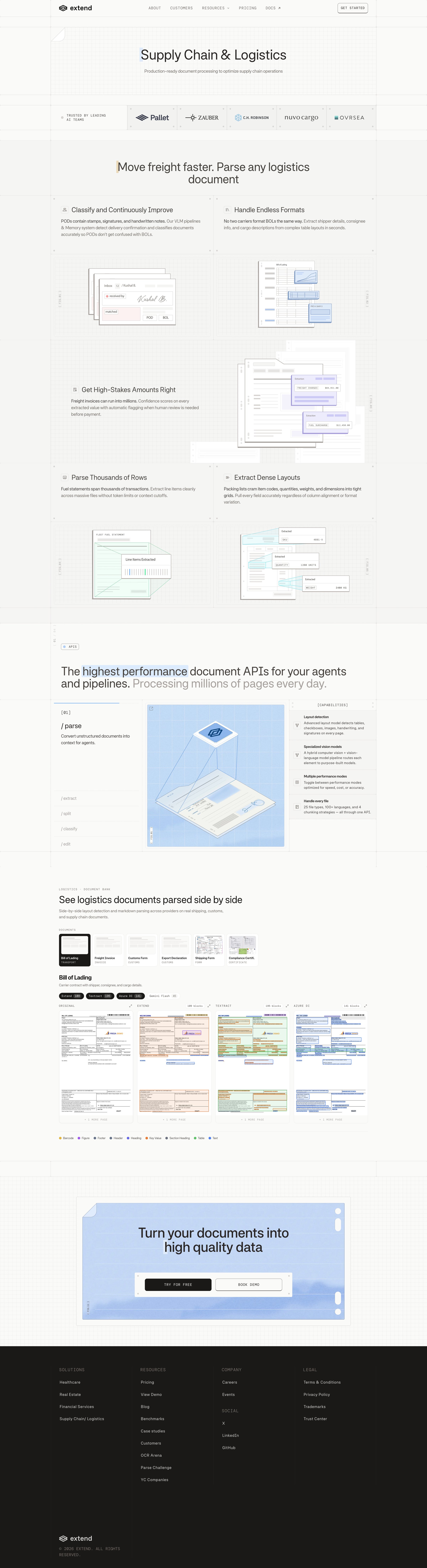

The screen is a marketing product page for 'Supply Chain & Logistics' document processing. It features a clean, multi-section layout with a light background and a grid pattern overlay. The header contains the 'extend' logo, horizontal navigation links (About, Customers,…
Explore the full SaaS screen library
Upgrade to unlock the full library.
Trusted by the best teams







